Grow
Grow
Continue to add to your website and expand it
This page will guide you through ways that you can consider maintaining and growing your new online space.
We recommend completing the “Design” and “Build” Paths before starting the “Grow” path.
Reaching out
Now that you have started to build and maintain your first self-hosted website, you can start building an audience. To do this, you may want to begin by sending a link to your website to friends and peers to see what they think of it to get feedback.
Once you have done this and you are happy with sharing your website with more people, you can start thinking about how to grow an audience for your work and how you might want to continue building your online space in future.
Post on your Own Site, Syndicate Elsewhere!
POSSE, abbreviation of “Publish (on your) Own Site, Syndicate Elsewhere“, is a content publishing model where you post content on your own domain first, and then push out (or syndicate) copies to 3rd party services with links back to the original content on your site. This way, the original version of your content stays within your control and ownership, and your content can be traced back to you and your domain. Other advantages to following the POSSE model include not having to rely on 3rd party services (social media sites and services hosted by big companies) and that your content will be more easily found through any web search engine.
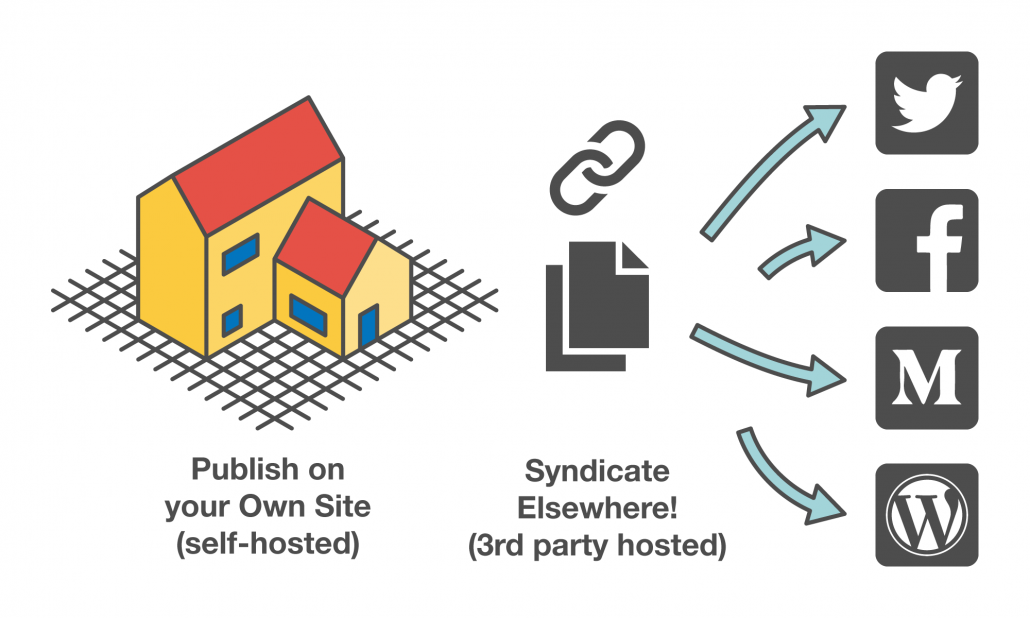
Your audience might be more comfortable or spend more time using social media services such as Twitter or Facebook to find and read new content rather than going to individual websites or using an RSS feed. Following the POSSE model means that you can syndicate your content from your domain to these spaces so that your friends can use whatever service they want to read your content, whilst allowing you to keep ownership of your work.
You might be thinking “well if my friends want to read my stuff on Facebook, why don’t I just publish it through my Facebook account?”. But what if your friends start using a different social media service in future? What if the social media service that everyone uses now changes its terms and conditions or gets shuts down? What happens to the content that you have already published then? If you publish content on your own site first you will always have an archive of your content available that you can link people to across different 3rd party services.
Ways of thinking about your online space… (part III)
Once you have built your first self-hosted website, you can build secondary websites that share the same domain name. With Coventry.Domains, your first website will likely be found on your main subdomain address, e.g. ‘yourname.coventry.domains’. Using sub-subdomains and directories, you can build additional websites that also sit on your domain.
Directories are additional websites built on your Coventry.Domains subdomain and can be recognised by the address: yourname.coventry.domains/directory
Sub-subdomains are additional websites built on your Coventry.Domains subdomain and can be recognised by the address: sub.yourname.coventry.domains
You may only ever need one website, with the option to create more pages to publish content as your site grows. If this is the case you may not want to create second websites, but it is useful to know what is possible in case you what to do this in the future.
You will need to create secondary websites if you ever want to test new features (e.g. plugins) on your existing website without the risk of breaking or if you need to create a space on your domain that looks or functions differently to the rest of your domain.
Click on the tabs below to see example scenarios of when you might want to create additional websites through use of directories and sub-subdomains on your domain.
This example is for when you want to install a new plugin to your existing website but don’t want to risk breaking your website (the new plugin may clash with existing plugins), or you want to play around with how the plugin works before making it live on your existing website. In this scenario you will likely already have people visiting your website, and don’t want to risk anyone visiting your website to see broken content.
You can clone your existing website and install it on a directory to play around with how this new plugin will work with your current content, theme, bespoke code or plugins. You may do this just because you are curious about how the new feature might work, or you may do this with the aim of making this change live on your existing website.
As this is a test website, make sure to make the directory name an obscure word or phrase that your regular website visitors are unlikely to stumble upon, e.g. ‘yourname.coventry.domains/test101’.
If you decide to make this test website you main website, you can replace your website with this site. Alternatively, if you have played around with the new feature but don’t want to use this test website you can delete it when you don’t want it anymore.
This example is for when you need part of your domain to have a different function or purpose to the rest of your domain. Your main website might display information about your projects and work, but you may want to create a website that is a project in of itself such as interactive content or a participatory site where visitors add their own content.
In this case you may or may not want this second site to look like your main website. If you make them both have the same theme, branding and header menu the two will look as if they are the same website to visitors. If you make them look different with different themes and branding they will look like distinct spaces. Think about what you want the purpose of each website to be and how you want those visiting the space to experience the two sites.
You can begin building this second website as a test site, and then when you are happy with it you can clone it to a directory name that you want to share widely. The directory name should ideally be short and related to the purpose of the site, e.g. ‘yourname.coventry.domains/projectname’. If you want visitors to go between these two websites make sure to list both as items on the navigation menu on each site.
Other Web Applications you can explore

Mediawiki is an open-source wiki software application, which you will have used when navigating the popular site Wikipedia. It allows users to generate informational content by creating, modifying, editing and improving articles on the site.

Grav is an alternative Content Management System (or CMS), that is based on simplicity of management and speed. It doesn’t use a database like WordPress does to manage content, which makes it much simpler and faster, at the expense of less features.

Omeka is a free, open-source web application that manages content, specifically attuned to exhibitions, artefacts and collaborations across these. It can be a great way to publish media-centric collections/repositories online.

Frederick Lanchester Library, Coventry University
Gosford Street, Coventry CV1 5DD
dmll@coventry.ac.uk | 02477 659495
@disrupt_learn