Build
Build
Create a site that is easy to navigate and read.
This page will guide you through how to build a website with WordPress, including how to structure your site and how to publish content.
We recommend that you visit the “Design” Path and complete it before you start this “Build” Path, as then you’ll have a good idea of what you want to get out of your website, and will make building it much easier.
With a clear vision in mind, this path will walk you through how to build a small, basic and functional website, which can house any kind of content, be it a blog, portfolio, forum, research repository, teaching aid or anything else. By the end of this path you will be able to build:
- A homepage
- A menu system
- Appropriate content for you site
- A categorised post system
- A customised style for your site
Ways of thinking about your online space... (part II)
On a single domain with web hosting you can create multiple websites. A way of imagining this is to think of a house with multiple extensions and rooms which all share the same main address (domain).
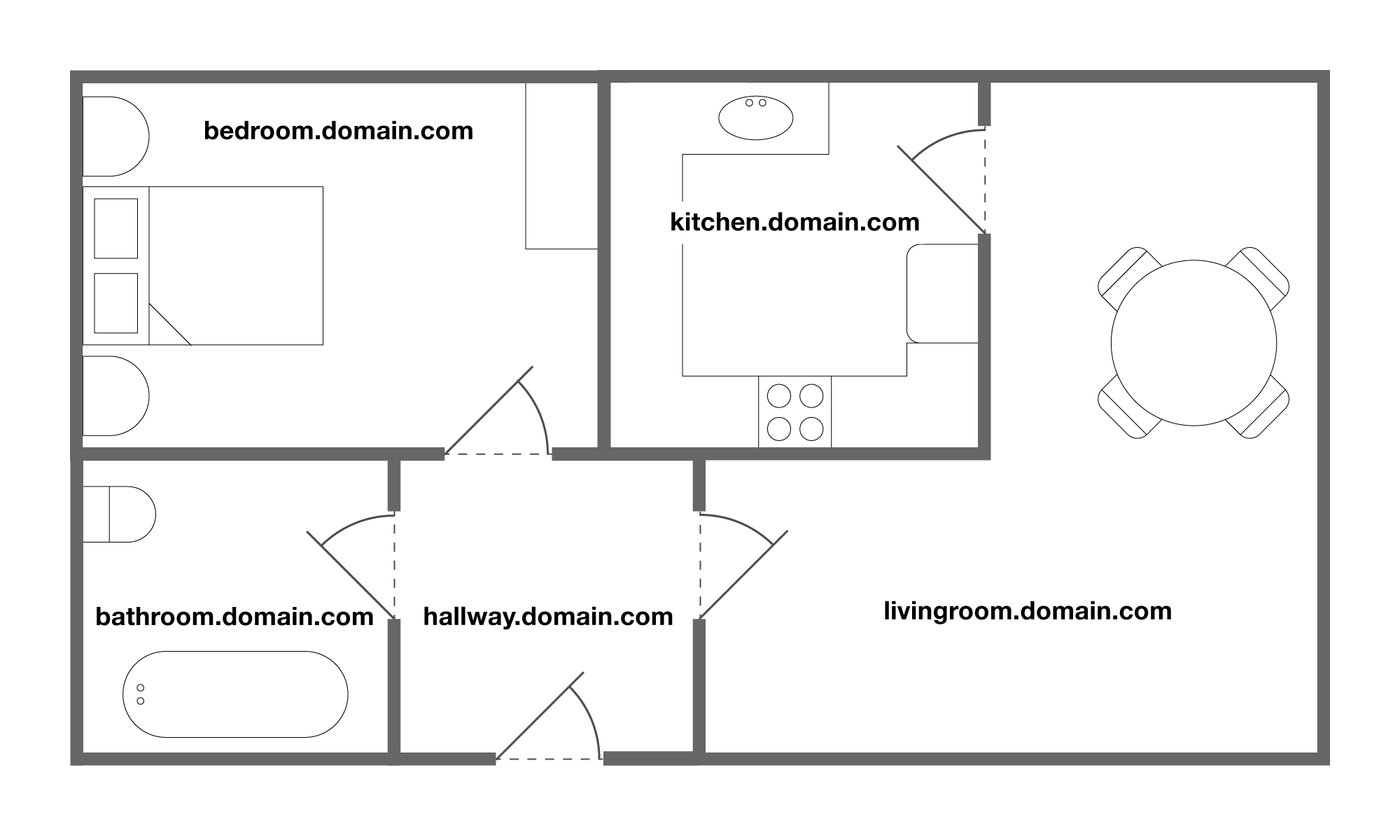
These website “rooms” act like subsections of the main domain, and are known as directories and subdomains.
Directories are additional websites built on your domain and can be recognised by the address: domain.com/directory
Subdomains are additional websites built on your domain and can be recognised by the address: sub.domain.com
Think of your main domain site as the main space in your house and these directories and subdomains as small extensions to your house, as they serve the same function, but are more easily seen as separate areas.
Each of the websites you build on your web hosting and domain can be as similar or distinct as you like. You could build one with the application WordPress and the next with MediaWiki or through HTML5. All of your websites might use the same theme and visual design, or they might look completely different. It’s up to you!
Building a basic site step-by-step
These tutorials will walk you through how to create a basic WordPress site, to show you how to create a website from scratch. Each tab will contain a tutorial video and text explaining each step. Everything demonstrated in a video will be detailed in the text written below.
Click on a tab to get started.
Registering an account with Coventry.domains can be started by following this link, which takes you to the coventry.domains homepage. From here, select “Login” at the top right and log in with your Coventry University email address and password.
You’ll be taken to a page asking for a password to view the Terms and Conditions for the project, here you should enter “321go” in the box (without the quotes), and from there read the Terms and Conditions carefully, making sure you understand them fully. Then at the bottom of the page you’ll have to enter your details to register for an account.
Once you’ve completed these steps, an email will be sent to us and we will manually approve your account, which may take some time depending on how busy the team is. When your account has been activated, you will receive an email that confirms you have an account, and on your next login to the site you will be prompted to ask for a domain name, which should be:
- Short
- Descriptive of your site
- Unique
After this has been chosen you’ll be redirected to your subdomain dashboard and you can start on your website!
Now we’ll show you how you can install WordPress on your domain. First of all get to your dashboard, which you can reach by logging into your Coventry domains account. Navigate to the “Applications” tab in the center section of the screen and select “WordPress”.
That takes us to the Installatron page for WordPress. Installatron is the program we use to install applications onto our website. A lot of information will be here about WordPress but just click “install this application” to get started. This takes us to a page with a number of configuration options; firstly the domain, just choose “HTTPS” followed by your domain name. We’re going to choose this over HTTP because it offers a more secure connection.
Next, we don’t need to leave a directory in there because it’s optional and we’re going to keep it at the top level of our domain without subdividing it any further. You should read and accept the end-user License Agreement, and it’s recommended that you keep the automatic backup and update settings the same.
It doesn’t matter what the administrator username or password is because of the Coventry University single sign-on you won’t need to remember them and they’ll be automatically input for you. Next, the website title and tagline will be shown on the website in most cases, however these can be changed at a later date so we don’t need to adjust them now, but you can if you wish.
It’s recommended you keep “limit login attempts” the same to increase your site security and you can leave the Advanced Settings as they are. When you’re all done we’re just going to click “install” at the bottom of that section, and after that you’ll be redirected to your installatron apps page, where you can see the blog installing.
Once your blog has been installed you’ll see three links that have appeared on the page. The first of these is the domain which holds your application; clicking this will take you to the page that visitors will see when they visit your blog. The second of these is the admin page for the application. This is what you will use to edit your WordPress website and the last of these links is a general WordPress support page. Towards the right-hand side of the screen you will see a number of options: firstly you can edit and configure the options which we used earlier; next you can backup your website; next you can clone the application itself and lastly you can uninstall WordPress.
Once we’ve installed a WordPress application onto our domain we’re going to want to change some of the look and the content on the website. To do that just click on the middle link of the three on your WordPress app page, which is your domain ending in “/wp-admin”. Clicking on that opens a new window with your WordPress application dashboard.
To manage your settings, click on “Settings” on the left side and find “General”, clicking that will give you the general site settings for your WordPress application. Here you can see the site title and tagline which I would recommend you change in order to make it stand out, we’re going to leave the address and the site address the same so people can easily find our website. Most of the settings on this page can be left alone, so I’ll run over important ones or ones you should change.
You can set the new user default role here; “subscribers” have the lowest amount of permissions on the website, all they can do is view certain material. “Contributors” is a step up they can submit content to the website to be approved. “Authors” can submit and then have the content automatically approved. “Editors” have similar permissions to an author but they can remove, delete, hide posts etc., basically do a lot more things with posts and pages and certain areas of the website. Finally, “administrators” can do everything the other users can do with the addition of changing site-wide settings such as themes and plugins.
It’s important if you change any settings you click “Save Changes” at the bottom of each of the settings pages. For the “Writing” settings we don’t need to change anything so we’re going to move on.
Onto the “Reading” settings; if you’re running a mainly blog-based website it’s recommended to keep your “latest posts” as the default homepage so that will give you a top bar still and the footer and everything but the page would change as you add posts, to show the latest ones. If you’re running more of a portfolio-based system you may want a static page so a homepage that will say the same. You will only have a standard “About” page for now but we can change that later on.
The next settings are how much is going to appear on a page at once: “for each article in the feed show full text or summary”. I recommend “summary” because it can get quite cluttered on a page if you’ve got a number of posts that are showing all of their text at once. Don’t forget to Save Changes!
We’re going to miss the discussion settings for now and cover those in a separate section.
In terms of “Media Settings” you shouldn’t need to change any of these, they are very standard in terms of image sizes you can upload to your website.
You can also see where your site content is stored, all the images you upload will be stored in this folder on your domain.
We’ve not changed anything here so we’re going to click on “Permalinks”. This is the way that people will find/see the URLs on your site so I would recommend changing the default to “post-name” as it gives a descriptive URL depending on what page or what posts they’re looking at. Lastly there are optional tag bases and things you can add yourself but you can explore those in your own time.
You can click on “Privacy” as the next menu setting. Here you can create a privacy policy page if your institution or certain laws require it.
Back on our WordPress dashboard, we’re going to take a quick look at any comments and discussion settings that you can alter on your website. Mouse over the “Settings” tab on the left hand side and from here select “Discussion”. The first two options are about sending and receiving notifications to and from other blogs about new articles. We’re just going to leave them as they are for now.
The third setting allows you to completely disable comments for your website, this will not work retroactively, which means that if you already have pages created and you uncheck this box, comments will still stay there and people can still comment on them however you can override this like it says here in individual articles. If you don’t wish any comments to be able to be posted on your website before you start building any content it’s recommended you uncheck this, you can always check it on later and re-enable comments for new articles.
The next settings relate to the strictness regulating commenting on your website, so how rigorous you want to be with weeding out potential spammers, trolls or people who don’t really engage with the content on your website. Some of these settings are about the level of discussion so if you have a lot of comments on your website it’s how much that gets subdivided or threaded which means comments that appear under each other and comments that reply to each other.
After this is the email settings so you can alter how often you get emailed about comments. “Moderation settings” we’re going to leave on, often these will get transferred to your junk folders so have a quick look out for these if you keep this email setting on. And we’re going to check “comments must be manually approved” on our website because it should improve the quality of the discussion and we can make sure we have direct control over what appears on our website.
These next two settings (Moderation and Blacklist) are varying levels of severity in terms of words that you’re allowing on your website. The moderation queues you can put in words, so if the word in any configuration appears on your website that will be automatically taken out for moderation. If we still have the manual approval setting this won’t do anything at the moment, but if we chose to uncheck that then this would become relevant.
And the comment blacklist is when any of these words show up they automatically just get put straight in the trash so you can put certain offensive words in the comment blacklist if you don’t wish to even moderate them.
And the last set of settings it’s just about avatars for commenters so each commenter will have a small image next to their comment so you can choose what sort of theme you’re going to go for with those. then you can also pick a nominal sort of age rating for your website as well. So after we’ve configured this how we want we’re just going to click Save Changes at the bottom, and there we go we can see settings are saved now discussion settings have been update
Now we’ve decided on all the settings for a WordPress website we’re going to take a look at the two main ways in which we can add content to it: posts and pages. Navigate to the left-hand side of your WordPress dashboard and select the “Post” section. From here we’re going to select “All Posts”. You’ll have a starting post by default, which you can change or delete if you want.
A post is more for regular content which you’re going to be posting onto your website pretty frequently so this could be things like a blog, a reflection or just any regular content which you’re going to be putting on there.
The “New Post” screen contains the URL through which we can navigate to your post, it contains the title and the body of the post itself through which there are a number of options, for example:
- You can add italics to a word
- You can bold words
- You can add hyperlinks
You can just click “Publish” on the right-hand side and that’s going to publish your posts to your website. Now on to the second method of adding content to your website – using pages.
Pages are for more static content. So this static content might be things like a “contact me” page with your contact details on, it also might be things such as a CV, portfolio or information on projects you’re working on; content which is likely to be relevant for a much longer time and you won’t be replacing or regularly updating throughout your website’s career. You can click “Add New” under the “Pages” tab on the left of the dashboard to add one.
You add content to a page in the same way you would to a post, and when you’re done just click “Publish” the same way you would with a post and it will be published to your website. You can see where this is by clicking on “Visit Site’ in the top-left of the page.
Now we can look at a couple of ways of categorising content on your WordPress website; categories and tags. Both of them involve the “post” medium of content on your website. We’re going to check out both of them. In general, you can think of categories as more for large topics and areas that posts may cover, for example these may be:
- Reflections
- Project A
- Project B
- Food
- Travel
- Et Cetera.
They can be created by hovering your mouse over “Posts” on the sidebar of your WordPress site, then selecting “Categories”. To create one, fill out “Name” and “slug”, which is what appears in the address bar, and should normally be a lowercase version of the Name. You can add a “parent category” that the category sits under, but for most sites this won’t be necessary, and similarly you can add a description of the category if you want to but it’s not necessary. Click “Add New Category” to create it when you’re ready.
You can add posts to a category by going to the post in question, and on the right-hand side of the page, selecting the tick-boxes with the categories you want it under.
Onto tags, which are different to categories in that they are more for the subject areas covered by your content, and are much more decided by the actual “stuff” in your posts. Some examples may be:
- JavaScript
- Project Management
- Review
- Et Cetera.
Once you’ve thought about this, you can create a tag in much the same way, navigate to the “Tags” menu on the sidebar, and complete the same process by entering a name, a slug and a description if you want one. You can tags to a post in a similar way as categories too, by selecting the post you want to add a tag to, and typing in the tag you want to apply in the area on the right-hand side of the screen. You can either type it or select from a list of common tags.
Now with your categories and tags made, and with them added to posts, their usefulness comes with menus. To access menus, hover over the “Appearance” tab on the left sidebar, then click “Menus”. To create a menu, type a menu name into the bar and click “Create Menu”, and underneath it you can select where it appears, for example “Top Menu” is a common place. Once you’ve done this you can add items to the menu from the left side, which can be categories, posts, pages or custom links. You have to click the box next to them and then click “Add to menu” to add them.
Once you’ve saved that you have a working menu system and categories and tags! We’ll go over how to use tags more in the next section.
A theme is a general site style for your WordPress website, it’s going to decide how your website’s laid out, the colour scheme, fonts and in general the overall look of your WordPress site. To take a look at themes, navigate to your wordpress dashboard, go to “appearance” and then select “themes” from that list. Here you’ll see a number of themes which WordPress has as default.
To add new ones we’re going to navigate to the top of this page and click “add new”. Now there are a number of tabs here: “featured” is a curated list from WordPress which is changed regularly, “popular” are the ones that are most downloaded throughout the entire system, “latest” are the most recently uploaded and “favourites” are a number of themes you can add so you can add themes to your favourites yourself. Once you’ve found a theme you like the look of, select it and just click “install” on the top left.
Once that’s finished installing from the themes page you can choose to activate our theme. Doing so will add the theme to your site and activate it; you can add as many themes as you want to your WordPress website but you can only have one active at a time.
Click “activate” from either the themes page or the page you are redirected to in order to do this.
Now onto the customiser: this is a tool built-in to WordPress that allows you to see changes on the page as you make them. To get to this, click “Customise” under the “Appearance” tab. What you will see is a sidebar on the left that shows a number of areas of the pages that you can edit. You can explore these in detail, but one of the useful things you can do is create sidebar sections and footer/header sections, where you can place widgets like a tag cloud, an archive, search bar, recent posts etc.
You can also add media to your pages, for example a header image can be added through the customiser.
Important Note: This customiser will be different depending on the theme you have active.
Inspiration from around the web

Evernote.com has a very simplistic homepage that links to every other page on the site somewhere, with a great sitemap at the bottom of the page. The top menu is also simple on the surface, but expands into a much larger system with a click.

The Mozilla.org website utilises a homepage with a number of cards that signify featured pages on their site, which is very easy to do with a visual builder like SiteOrigin or Elementor, but can be trickier with the standard WordPress builder.

Airbnb has a landing page that gets straight to the point, with a search bar front and centre, and scrolling down you can find featured sections and paths to explore the site.

Printed Matter books uses a graphically simple, bright homepage that has a lot of information on. It used a variety of scrolling menus and other arrays of graphics and tabs to display information.

The University of Mary Washington (UMW) has their own Domains initiative, and their page for it is beautifully simple, with only what is actually necessary on the site. This means both users can easily navigate the site and also it will be extremely easy to build, ensuring the theme looks good and the header image sits properly is most of the work.
For ideas around why and how to add open-licence content onto your website, visit opened.coventry.domains.

Frederick Lanchester Library, Coventry University
Gosford Street, Coventry CV1 5DD
dmll@coventry.ac.uk | 02477 659495
@disrupt_learn